Family-focused planner that organizes US college application tasks
Tracks application tasks, deadlines, and school research on a shared timeline: collaborative task lists, automated deadline tracking, and AI study helpers. Onvello: College Planner, from OnvelloDev, targets high school students in grades 10‑12, their parents, and college counselors. Key capabilities include synchronized family plans, school-specific deadline monitoring, and AI-assisted explanations and flashcard creation, which help families manage multiple applications and document requirements in one place.
What the app does for college planning
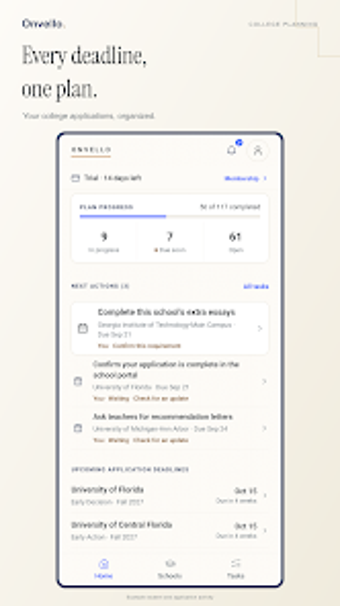
Onvello centralizes research, deadlines, and task ownership by combining a school research database with a task manager that shows Early Action, Regular Decision, and financial aid deadlines. The app links tasks such as essays, recommendations, and transcripts to specific schools, so a student or parent can see who owns each item and when each requirement is due.
How the AI features support study and application writing
AI integration answers application questions and generates study aids using an embedded ChatGPT connection. The app can explain complex requirements and convert class notes into flashcards, which supports targeted review for subject tests and essay preparation rather than providing generic prompts.
Is it suitable for students, parents, or counselors?
Designed for joint student–family workflows, the app offers shared plans with separate permissions so parents and students collaborate on the same timeline. The current design focuses on US four-year college planning, so it fits high school juniors and seniors and the adults who manage or advise them on tasks and timelines.
How it tracks progress and keeps timelines visible
Automated tracking and synchronized reminders maintain visibility across contributors. The timeline view and deadline tracking show school-specific aid dates and application stages, and the task list marks ownership for essays and transcripts, which helps families monitor completion without separate spreadsheets.
Clear fit for US high school families who need a shared application workflow
Onvello is a practical tool for students and parents who want a single place to coordinate application tasks and interpret requirements with AI help. Expect the app to concentrate on four-year US college planning; families aiming for other institution types should verify coverage before relying on it. A useful tip is to assign task owners early so the shared timeline reflects responsibility from the start.